

BGeo SDK
BGeo is a background-geolocation SDK for Flutter. It keeps tracking across app backgrounding, kill, and reboot, uploads locations natively (no Dart in the hot path), and adapts GPS use to motion to save battery.
- iOS & Android — implemented as a Flutter plugin with a native
Android/iOS engine behind a Dart
MethodChannelbridge. - Native offline upload — a durable queue drains to your server with batching, backoff, and optional JWT refresh; survives process death.
- Motion-based tracking — Kalman smoothing, activity recognition, a stationary geofence/region wake, elastic distance filter.
- Closed engine, open bridge — the engine ships as a prebuilt
BGeoCore.xcframework(iOS) +bgeo-androidAAR (Android) behind an open Dart bridge you can read end to end. - Free — including for commercial apps. No license key, no registration, no payment.
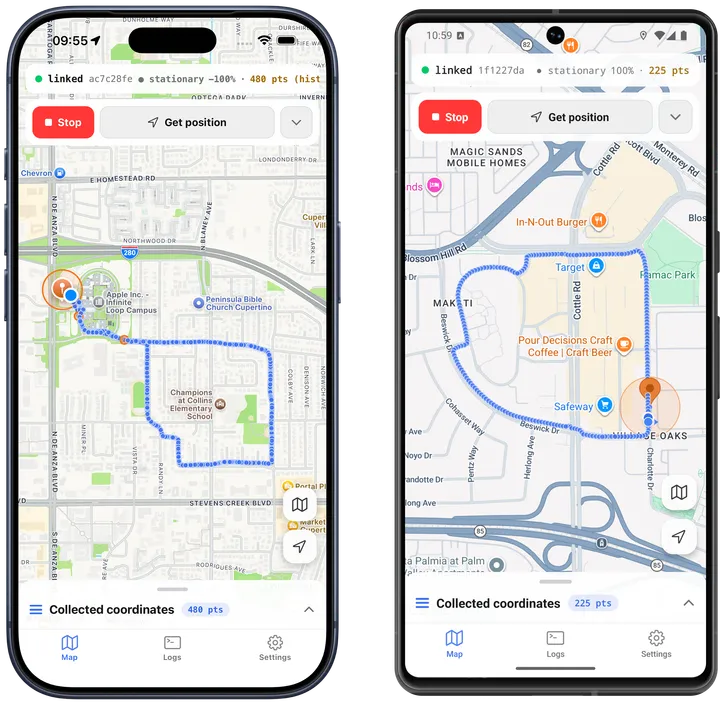
The SDK’s own source repo ships a full example app
under example/ — a Flutter dev tool with a map screen (live tracked route,
geofence creation by long-press), a settings screen for tuning Config at
runtime, and a log console for on-device diagnostics. Everything it records
stays on the device.
Philosophy
BGeo is designed around one idea: configure once, then get out of the way.
- Call
ready(config)once, at every app launch. It’s not a one-time setup call — it’s meant to run on every cold start, every time. Theconfigyou pass merges over whatever was persisted natively from the previous session (or the SDK’s defaults, on first run), so a launch that doesn’t callready()at all still keeps tracking with its last known configuration. - The API is event-driven, not poll-driven. Subscribe to
onLocationandonMotionChangeonce and let the engine push updates to you — there’s no location loop to manage in Dart. - Tracking and upload run natively and survive Dart isolate death. Once
start()has been called, the native engine keeps filtering, persisting, and uploading locations whether your app is backgrounded, killed by the OS, or not yet relaunched since a reboot. Dart is a subscriber to what’s happening, not the thing making it happen.
Architecture
BGeo is an open Dart bridge around a closed, prebuilt engine: the
Dart API, event plumbing, and MethodChannel bridge code are readable
source (lib/src/*.dart); the location-filtering, motion-classification,
persistence, and HTTP upload logic ship as compiled binaries
(BGeoCore.xcframework on iOS, a bgeo-android AAR on Android). You get
full visibility into how your app talks to the SDK, without needing to
vendor or rebuild the tracking engine itself.
Platform support
BGeo targets iOS and Android only — there is no Flutter web or desktop support, since the tracking engine is mobile-only. See Compatibility for the full version matrix.
Where to go next
Getting Started
- Installation — add the package, wire up the Android Maven repo and iOS deployment target.
- Quickstart — a full, running
main.dartin a few minutes. - Permissions & background location — what Google Play and the App Store require you to declare.
How it works
- Tracking lifecycle — how the SDK tracks across foreground, background, kill, and reboot.
- Data pipeline — how a location moves from fix to filter to queue to your server.
Guides
- HTTP & authorization — shaping the upload body, batching, and JWT refresh.
- Geofencing — app-facing geofences and proximity slicing.
- Boot & killed-app behavior — what survives a reboot or a force-quit, and how.
- Logging & debugging — the native log store and field diagnostics.
- Example app — the SDK repo’s own dev/debug app, screen by screen.
- Migrating from Transistorsoft — what maps over directly, and what differs.
API Reference
- Methods, Config, Events, Data types, Constants — the complete API surface.
- Compatibility and Limitations — supported versions and known no-ops.