

Example app
The SDK’s source repo ships a full example app under example/ — a dev/debug
tool, not a template to copy into your project, and the Flutter twin of the
React Native example. It depends on the plugin the same way a real consuming
app would: a path: dependency in its pubspec.yaml, resolved straight from
the repo’s lib/, so editing plugin source is immediately reflected in the
example on the next hot restart without requiring a pub publish step.
Everything runs on the device: no server, account or key is needed, and
nothing the app records — track, logs, geofences — leaves the phone unless
you set your own url in Settings.
Running it
cd exampleflutter pub getflutter runThe Map tab uses flutter_map with
OpenStreetMap raster tiles, so no maps API key is needed. The OSM public tile
servers are not free for general use — read the
OSM Tile Usage Policy
before reusing this setup in a real app.
Tour of the screens
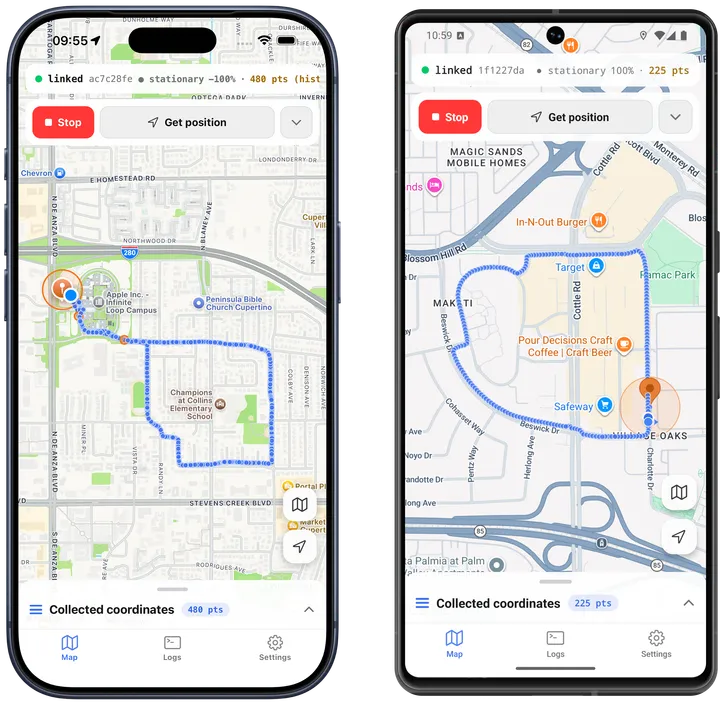
The app has three tabs: Map, Logs, Settings.
Map
Start/Stop tracking, a getCurrentPosition()
button, Follow / points / line / geofence layer toggles, a From/To range
picker over the locally recorded history, a 1000-point paging window, and a
collapsible table of collected coordinates. Long-press the map to add a
geofence; tap a geofence pin to edit or delete it — see the
geofencing guide.
Logs
The structured event stream, with a level filter, follow-tail and clear. Your
own Dart-side lines stream live; the native engine’s persisted rows are polled
from getLog() and merged in by
timestamp. See the logging guide for what ends
up in this stream and how it’s retained.
Settings
A theme picker (system/light/dark), then every working
Config key. Changing a field calls
setConfig() immediately and
persists the override across restarts; Reset to defaults clears every
override. Below the config sections, an engine-state panel shows
getState() fields with
upload-queue tools: sync() (uploads
only when you have set a url), destroy queue, and reset odometer.
Listeners and headless task
main.dart subscribes to
onLocation,
onMotionChange,
onHeartbeat,
onProviderChange,
onGeofence,
onGeofencesChange,
onHttp and
onConnectivityChange,
and registers a top-level headless task that prints each event’s name and
params when the app has been killed — see
Boot & killed-app behavior: Android headless tasks
for what that task can and can’t do.