

Example app
The SDK repository
ships a full console under example/. It is not a hello-world: it is the tool
the SDK is developed against, and the fastest way to see what a config change
actually does on a real device.
git clone https://github.com/dc-bgeo/android-background-geolocation.gitcd android-background-geolocation./gradlew :example:assembleDebugNo account or key is needed, and everything the app records — track, logs,
geofences — stays on the device. The app uploads nothing; to try the SDK’s
HTTP upload, set url (and optionally
authorization) in your own app’s Config — see the
HTTP guide.
Three tabs
Map — the live track, geofence circles and pins, and the controls that matter while walking around with a phone: Start/Stop, a one-shot Get position, layer toggles (Follow, points, polyline, geofences), and a from/to range picker that filters the track recorded on the device. Long-press the map to create a geofence; tap a pin to edit or delete it. Long tracks are drawn a page at a time, newest first, with a pager for stepping back.
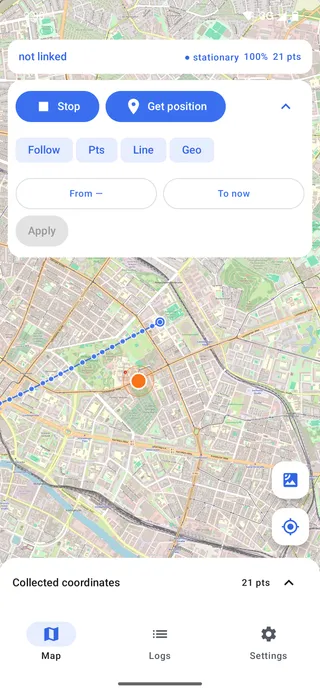
Logs — the merged event stream: your app’s lines and the engine’s own
diagnostics on one timeline, filtered by level, with follow-tail and clear.
This is the same data getLog() returns, which makes it a good way to learn
what the engine logs before you go looking for it in the field.
Settings — every working config key, grouped, applied immediately through
setConfig() and persisted as overrides. Rejected values surface their error
next to the field that failed rather than in a toast. Below the config there
is an engine panel: the getState() health fields, the upload-queue and log
counters, and the actions that have no other home — changePace(), destroy
queue, destroy log, resetOdometer().
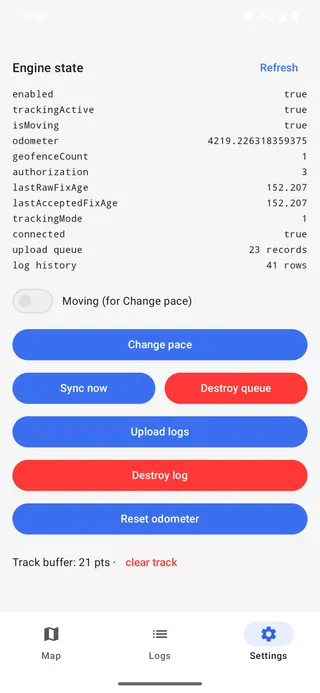
The engine panel, below the config keys.
What to read in it
The example mirrors the React Native and Flutter examples file for file, so a concept you find here has a counterpart there. The parts worth reading if you are integrating:
| File | Why |
|---|---|
ExampleApplication.kt | attach() in Application.onCreate, and why it is there and not in the Activity. |
ExampleApp.kt | Event subscriptions and ready() in the order that matters — subscribe first, then ready(). |
MainActivity.kt | PermissionRequester constructed in onCreate, before the Activity starts. |
ConfigSchema.kt | Every config key with its real default — the same table as the Config reference, in code. |
Its own tests
./gradlew :example:testThe example’s non-UI logic — the config store, the history loader, the log pipeline — is unit-tested on the JVM. Worth a look if you want a model for testing your own integration without an emulator in the loop.