

Quickstart
This assumes Installation is
done: the dependency resolves, attach() runs in Application.onCreate, and
ACCESS_BACKGROUND_LOCATION is in your manifest.
The whole thing
class MainActivity : ComponentActivity() {    private lateinit var permissionRequester: PermissionRequester
    override fun onCreate(savedInstanceState: Bundle?) {        super.onCreate(savedInstanceState)        permissionRequester = PermissionRequester(this)
        // Subscribe BEFORE ready(): events buffered during startup are        // replayed to the first subscriber, so nothing that happens while the        // engine comes up is lost.        lifecycleScope.launch {            BackgroundGeolocation.locations.collect { location ->                Log.d("BGeo", "${location.coords.latitude}, ${location.coords.longitude}")            }        }
        lifecycleScope.launch {            BackgroundGeolocation.ready(                Config(                    distanceFilter = 10.0,                    stopTimeout = 5,                    debug = true,                ),            )            BackgroundGeolocation.requestPermission(permissionRequester)            BackgroundGeolocation.start()        }    }}
That is a complete tracker. What each line is doing, in the order it matters:
ready(config) — configure, do not start
ready() applies configuration and brings the engine up; it does not begin
tracking. It returns the State snapshot,
whose enabled tells you whether tracking was already running from a previous
process — which is the normal case after a reboot or a background relaunch:
val state = BackgroundGeolocation.ready(config)if (state.enabled) { // Already tracking; do not call start() again, and reflect this in your UI.}Call ready() on every launch, with the same config. It is idempotent, and it
is what re-attaches your process to tracking that never stopped.
requestPermission() — before start(), not after
Covered in Permissions. Skipping
it does not fail loudly: start() succeeds and the engine runs, it simply
never receives a fix.
start() — begin tracking
BackgroundGeolocation.start() // persists "enabled"; survives process deathBackgroundGeolocation.stop() // the only thing that turns it offstart() persists the intent. The engine keeps tracking across backgrounding,
process death and reboot until something calls stop() — which is the whole
point of the SDK, and also why a debug build left running overnight will still
be tracking in the morning.
Collecting events
Two equivalent styles. Flow for structured concurrency:
lifecycleScope.launch { BackgroundGeolocation.locations.collect { location -> /* ... */ }}lifecycleScope.launch { BackgroundGeolocation.motionChanges.collect { event -> Log.d("BGeo", "isMoving=${event.isMoving}") }}Callbacks when a Flow is awkward (a plain Service, a Java caller):
val subscription = BackgroundGeolocation.onLocation { location -> /* ... */ }subscription.remove()Every event has both forms — see Events.
Each Flow property mints a fresh subscription per collector, so two
collectors of locations both get every fix.
A one-shot position
val location = BackgroundGeolocation.getCurrentPosition( CurrentPositionOptions(samples = 1, timeout = 30.0),)Independent of start(): it works while tracking is off, and it does not turn
tracking on.
Sending locations somewhere
Point the engine at your server and it uploads from native code, with a durable queue behind it — no Kotlin of yours in the hot path, and no data lost when your process dies:
BackgroundGeolocation.ready( Config( distanceFilter = 10.0, url = "https://api.example.com/locations", autoSync = true, batchSync = true, maxBatchSize = 50, authorization = AuthorizationConfig( strategy = "JWT", accessToken = accessToken, refreshToken = refreshToken, refreshUrl = "https://api.example.com/auth/refresh", ), ),)See HTTP & authorization for the retry, backoff and token-refresh behaviour.
Seeing what the engine is doing
BackgroundGeolocation.ready(Config(debug = true, logLevel = 4))debug = true plays a sound on each significant event; logLevel = 4 persists
the engine’s own diagnostics, readable with getLog(). Both are development
aids — turn them off in release. Logging & debugging
covers the rest, including getState()’s health fields.
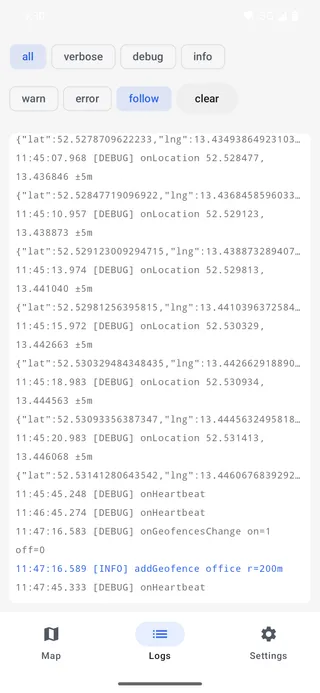
The same lines reach Logcat; the example app’s Logs tab (above) shows them on the device itself, interleaved with the native engine’s own rows.
Next
- Tracking lifecycle — when the engine decides you are moving
- Config — every key
- Example app — a full console with a map, logs and a settings screen