

Quickstart
This assumes the package is already installed (see
Installation) and that your
app’s manifest/Info.plist already declare the permissions covered in the
previous page, Permissions & background location —
the SDK cannot request a permission the app hasn’t declared.
A complete App.tsx
import React, { useEffect } from 'react';import { Text, View } from 'react-native';import BackgroundGeolocation, {  type Location,  type MotionChangeEvent,} from '@dc-bgeo/react-native-background-geolocation';
export default function App() {  useEffect(() => {    // Subscribe BEFORE ready() so no early location/motionchange event —    // including the initial `enterMoving` probe ready() may fire while    // resuming an already-enabled session — is missed.    const locationSub = BackgroundGeolocation.onLocation((location: Location) => {      console.log('[location]', location.coords, 'moving:', location.is_moving);    });
    const motionSub = BackgroundGeolocation.onMotionChange(      ({ isMoving, location }: MotionChangeEvent) => {        console.log('[motionchange]', isMoving, location?.coords);      },    );
    BackgroundGeolocation.ready({      desiredAccuracy: BackgroundGeolocation.DESIRED_ACCURACY_HIGH,      distanceFilter: 30, // metres between points while moving      // stopTimeout is in MINUTES, not seconds (see the Config reference) —      // 5 minutes of continuous stillness before the engine commits to      // stationary. This is also the SDK default; spelled out here for clarity.      stopTimeout: 5,      url: 'https://your-server.example/locations',      logLevel: BackgroundGeolocation.LOG_LEVEL_INFO,      stopOnTerminate: false, // keep tracking after the app process is killed      startOnBoot: true, // resume tracking after a device reboot    }).then(async state => {      if (!state.enabled) {        // requestPermission() runs the staged permission flow (Android:        // fine → background → activity recognition; iOS: location        // authorization) — see the Permissions page for what each platform        // needs declared before this resolves with anything but denied.        const status = await BackgroundGeolocation.requestPermission();        if (status === BackgroundGeolocation.AUTHORIZATION_STATUS_ALWAYS) {          await BackgroundGeolocation.start();        } else {          // Denied, restricted, or When-In-Use-only — don't start tracking.          // Prompt the user back through your own onboarding/Settings nudge.          console.warn('[bgeo] insufficient location authorization (status:', status, ') — not starting');        }      }    }).catch((error) => console.warn('[bgeo] init failed', error));
    return () => {      locationSub.remove();      motionSub.remove();    };  }, []);
  return (    <View style={{ flex: 1, alignItems: 'center', justifyContent: 'center' }}>      <Text>BGeo is tracking in the background.</Text>    </View>  );}
What you should see
- Permission prompts. On first launch,
requestPermission()walks through the OS dialogs — Android’s staged “While using the app” → “Allow all the time” → activity-recognition prompts, or iOS’s When In Use / Always dialog. See Permissions & background location for the manifest/Info.plistdeclarations these prompts depend on — without them, the OS denies the request outright rather than showing a dialog. If the resolved status isn’tAUTHORIZATION_STATUS_ALWAYS, the code above logs a warning and skipsstart()instead of tracking with insufficient authorization. - A
motionchangeevent. Once tracking starts, walk (or drive) away from where the device was resting. You’ll see[motionchange] truelogged as the motion state machine decides the device is moving; standing still again for the configuredstopTimeoutlogs[motionchange] falseonce it commits back to stationary. locationevents. While moving,[location]logs fire roughly everydistanceFiltermetres, each withlocation.coordsand the currentis_movingverdict.- Queue draining, or 401s. Locations upload natively as they’re queued.
Point
urlat a real endpoint and you’ll see them arrive server-side with no JS involvement; point it at a placeholder (as above) and you’ll instead see repeated connection failures/401s in the log as the queue keeps retrying — that’s expected until a real server is listening. See the HTTP guide for batching, retries, and JWT-refresh once you’re pointing at a real backend.
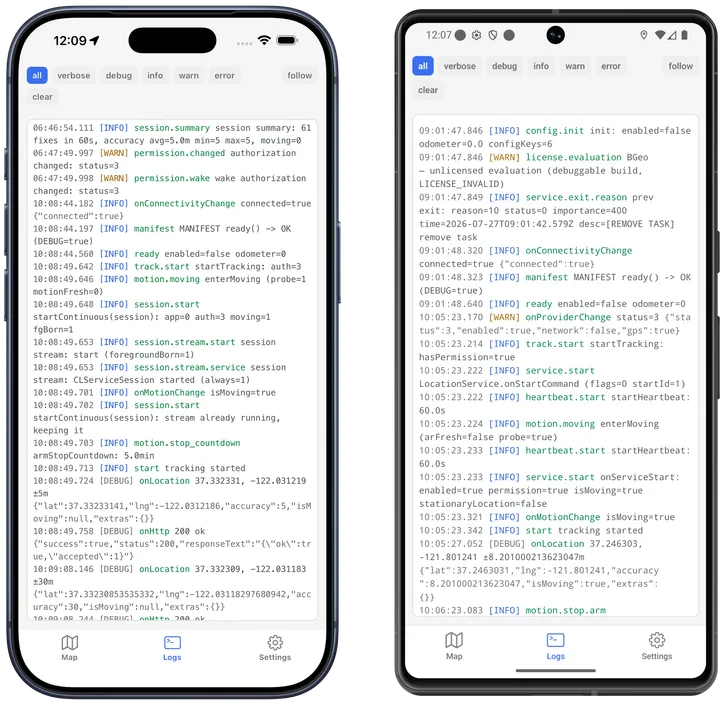
The same lines land in Metro; the example app’s Logs tab (above) shows them on the device itself, interleaved with the native engine’s own rows — see the logging guide.