

Permissions & background location
Background location is the #1 source of store-review rejections, and the single most common reason a tracking integration “stops working” once a tester backgrounds the app. Both platforms treat background location as a separate, more sensitive grant than ordinary foreground location — you (the app) have to declare it, justify it to the store, and request it at runtime. The SDK cannot do any of that for you.
Foreground-only authorization is not a degraded version of background tracking — it’s a different mode entirely:
- iOS: with only When In Use authorization, Core Location delivers
updates while your app is visible (and briefly after backgrounding), then
stops. There is no continuous route once the app is truly backgrounded —
the OS will not launch
UIBackgroundModes: locationdelivery without Always authorization. - Android: without
ACCESS_BACKGROUND_LOCATION, the OS stops delivering location fixes to your app the moment it isn’t in the foreground — regardless of whether a foreground service and its notification are still running. Fine/coarse location alone only covers foreground use.
If your product needs a route while the phone is in the user’s pocket, plan for Always/background from the start — not as a follow-up permission you can add later without re-doing onboarding.
iOS
When In Use vs. Always
iOS authorization is staged:
- When In Use — the app can read location while foregrounded. This is the initial authorization iOS grants from the first location prompt.
- Always — required for background delivery. Depending on how your
Info.plistkeys and prompt are set up, iOS either offers Always directly on the first prompt, or upgrades from When In Use to Always with a second, separate system prompt shown later (sometimes after the app has used location in the foreground for a while). Exactly when that second prompt appears is decided by iOS, not the app — don’t build logic that assumes it fires at a specific moment.
The SDK’s requestPermission()
requests location authorization only; on iOS it does not request Motion
authorization itself — see Rolling your own permission flow
below.
Precise Location
Since iOS 14, users can grant Precise or Reduced location accuracy
independently of When In Use/Always. Reduced accuracy is a valid, permanent
user choice — the SDK and your app must work acceptably with it if you
support it. The Accuracy authorization
constants (ACCURACY_AUTHORIZATION_FULL / ACCURACY_AUTHORIZATION_REDUCED)
reflect the current state; read them from getProviderState()
or the accuracyAuthorization field on onProviderChange.
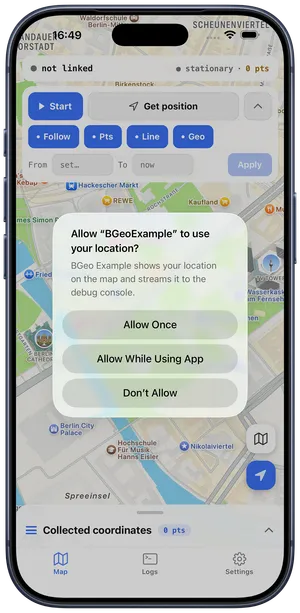
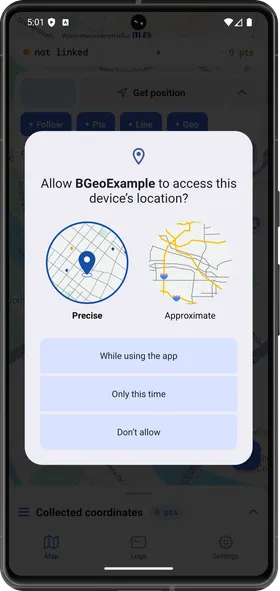
The first location prompt is where accuracy is decided: iOS grants full or reduced accuracy alongside When In Use (left), while Android makes the Precise / Approximate choice explicit in the dialog itself (right).
If your feature genuinely requires full accuracy for a single session (e.g. a one-off “share my exact location now” action) rather than as a persistent grant, request it explicitly:
const accuracy = await BackgroundGeolocation.requestTemporaryFullAccuracy('DeliverFullAccuracy');purpose ('DeliverFullAccuracy' above) must exactly match a key you’ve
added to NSLocationTemporaryUsageDescriptionDictionary in Info.plist —
see Info.plist keys
for the full key list.
Info.plist recap
The keys themselves — NSLocationAlwaysAndWhenInUseUsageDescription,
NSLocationWhenInUseUsageDescription, NSMotionUsageDescription,
UIBackgroundModes → location, and the optional
NSLocationTemporaryUsageDescriptionDictionary — are documented with sample
values in Info.plist keys.
Write real justification strings for each: App Store review rejects vague or
generic usage descriptions, especially for the Always/background string.
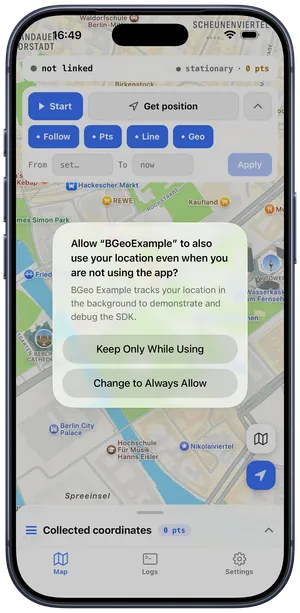
The Always upgrade arrives as its own prompt, worded from the usage description you wrote — iOS decides when to show it.
Android
Declare the permission
The SDK’s AAR merges foreground and fine/coarse location permissions into
your app automatically (see the full merged-vs-declared table in
Permissions merged from the engine AAR),
but not ACCESS_BACKGROUND_LOCATION — Google Play requires the app,
not a library, to own that declaration. Add it to your app manifest:
<uses-permission android:name="android.permission.ACCESS_BACKGROUND_LOCATION" />FINE vs. COARSE, and background
ACCESS_FINE_LOCATION gives GPS-grade fixes; ACCESS_COARSE_LOCATION is a
network/cell-grade fallback the OS may downgrade to. Neither implies
background access on its own: starting with Android 10, an app needs the
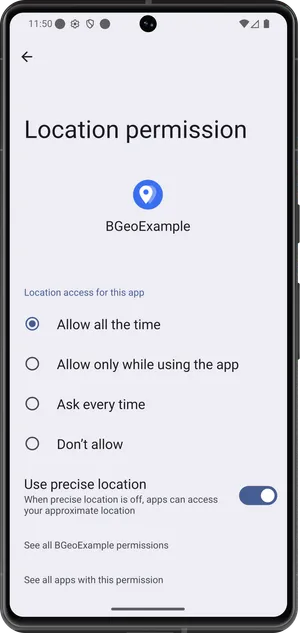
separate ACCESS_BACKGROUND_LOCATION grant — commonly surfaced to the user
as “Allow all the time” — to keep receiving fixes once it’s no longer in
the foreground. On newer Android versions the OS increasingly declines to
offer “Allow all the time” inline alongside the foreground prompt, and
instead routes the user to the app’s system Settings page to pick it as a
second, separate step.
Activity recognition and the degraded fallback
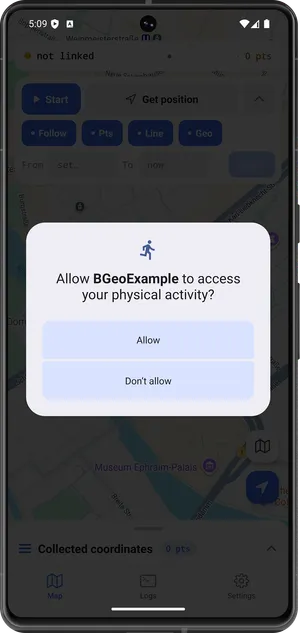
ACTIVITY_RECOGNITION drives the moving/still motion state machine via Play
Services. If the user denies it (or it’s never granted), tracking still
runs, but in a degraded mode: motion detection falls back to speed-based
heuristics plus a roughly 200-meter stationary geofence to re-engage motion
detection when the device moves off. Request it — and explain why in your
own onboarding UI — rather than treating it as optional.
Foreground-service notification
Android 13+ requires POST_NOTIFICATIONS for the tracking foreground
service’s persistent notification; it’s part of the AAR’s merged permission
set (see the full table in
Permissions merged from the engine AAR).
Without it, the notification can’t be shown, but the OS still requires the
foreground service to run for background tracking to work reliably.
Request at runtime
await BackgroundGeolocation.requestPermission();requestPermission() runs a staged Android chain rather than one combined
dialog — and it’s not an unconditional linear sequence. It starts at (and only
requests) the first permission that’s still missing, skipping any step
already granted, whether that’s on the very first call or a later one:
- If background location and activity recognition are already both granted, it returns immediately with the current status — no dialogs, no re-prompting for permissions the user already granted.
- Otherwise, if fine/coarse location isn’t granted yet, it requests that first. If fine/coarse is already granted, this step is skipped entirely — the call goes straight to step 3.
- Once fine/coarse is settled, if
locationAuthorizationRequestis'Always'(the default) and background isn’t already granted, it requestsACCESS_BACKGROUND_LOCATION(“Allow all the time”). With'WhenInUse', or if background is already granted, this step is skipped. - Once background is settled, if activity recognition isn’t already granted,
it requests
ACTIVITY_RECOGNITION. If it’s already granted, this step is skipped too. - It resolves with one of the
AUTHORIZATION_STATUS_*constants.
So a call from an app that already holds fine/coarse location jumps straight to the background (or activity-recognition) step — it never re-requests fine/coarse. The early-return in step 1 checks both background and activity recognition — not just background — specifically so the activity-recognition prompt is never silently skipped on a return visit.
flowchart TD
    A[requestPermission called] --> B{Background AND Activity\nRecognition already granted?}
    B -->|Yes| Z[Early return: current status]
    B -->|No| C{FINE/COARSE\nalready granted?}
    C -->|No| C1[Request FINE / COARSE location]
    C1 --> D
    C -->|Yes, skip| D{locationAuthorizationRequest == 'Always'\nAND background not granted?}
    D -->|Yes| D1["Request BACKGROUND\n(ACCESS_BACKGROUND_LOCATION,\n'Allow all the time')"]
    D1 --> E
    D -->|No, skip| E{Activity Recognition\nalready granted?}
    E -->|No| E1[Request ACTIVITY_RECOGNITION]
    E1 --> F[Resolve AUTHORIZATION_STATUS_*]
    E -->|Yes, skip| F
On iOS, requestPermission() requests location authorization only (When In
Use → Always, per locationAuthorizationRequest); there is no equivalent
staged chain to draw, since Activity/Motion authorization is a separate
system prompt outside this call.
Google Play prominent disclosure
Play policy requires a prominent in-app disclosure before the permission prompt, explaining what you collect and why, plus a Play Console Location permissions declaration form. Apps that track in the background without an approved declaration are rejected or removed. Budget review time for this.
Rolling your own permission flow
requestPermission() is convenient but opinionated about ordering. Nothing
requires you to use it — many apps drive permissions step-by-step with a
library like react-native-permissions
instead, so the request order can be interleaved with custom onboarding UI
(e.g. showing a rationale screen between the When In Use and Always steps,
or requesting iOS Motion authorization — PERMISSIONS.IOS.MOTION — at a
specific point in onboarding). Both approaches are fully supported: the SDK
never requests permissions on its own initiative outside an explicit
requestPermission() call, so ready()
and start() will simply reflect
whatever authorization state already exists when you call them.
Settings nudges
Once a user has denied or downgraded a permission, the only way back is the system Settings app — the OS won’t re-show its own prompt. The SDK can optionally nudge the user there for you:
locationAuthorizationRequest— declares whether the app wants'Always'or'WhenInUse'; this also decides what counts as “insufficient” for the nudge below.locationAuthorizationAlert— an opt-in dialog (no default English strings are ever shown unless you set this) offering a button that deep-links to the app’s Settings page, shown automatically when authorization is insufficient perlocationAuthorizationRequest, or when Location Services are off entirely.disableLocationAuthorizationAlert— suppresses that dialog once your own onboarding already covers it, so the user doesn’t see two prompts.
Reacting to permission changes
Authorization can change at any time outside your app — the user can revoke
it from Settings while your app is backgrounded. Subscribe to
onProviderChange to
react to that, or call getProviderState()
for a one-shot read:
const sub = BackgroundGeolocation.onProviderChange(({ status, enabled, gps }) => { const hasBackgroundAuth = status === BackgroundGeolocation.AUTHORIZATION_STATUS_ALWAYS; // 3 // ...update your UI / prompt the user back to Settings});Compare status against AUTHORIZATION_STATUS_ALWAYS (3) specifically —
not just “truthy” or “not denied” — since AUTHORIZATION_STATUS_WHEN_IN_USE
(4) is also a valid, non-denied status but does not authorize
background tracking. See the full
Authorization status
table for every value.