

Installation
Requirements
- React Native ≥ 0.76 (New Architecture only)
- iOS ≥ 15.5, Android minSdk 24
- Expo SDK 54+ if you use the config plugin — a development build, not Expo Go
See Compatibility for the full support matrix.
Install the package
npm install @dc-bgeo/react-native-background-geolocationAutolinking wires up the native module on both platforms — there is no manual linking step. What’s left on each platform is native project configuration: pods on iOS, a Maven repo + manifest permissions on Android.
npx expo install @dc-bgeo/react-native-background-geolocationThen add the bundled config plugin to app.json. Everything the native
projects need — usage strings, background modes, the Android
Maven repo and the background-location permission — is written at prebuild, so
you never edit Info.plist or AndroidManifest.xml by hand:
{ "expo": { "plugins": [ ["@dc-bgeo/react-native-background-geolocation", { "locationAlwaysAndWhenInUsePermission": "Keep tracking your route while the app is closed.", "motionPermission": "Detect when you start and stop moving.", "fullAccuracyPurpose": "Precise location is required to track your route accurately." }] ] }}Then generate the native projects and run a development build:
npx expo prebuildnpx expo run:android # or: npx expo run:iosPlugin options
Every option is optional — omit the whole props object and you still get
working usage strings, the location background mode, the Maven repo and
ACCESS_BACKGROUND_LOCATION.
| Option | Default | What it writes |
|---|---|---|
locationWhenInUsePermission | generic string | NSLocationWhenInUseUsageDescription |
locationAlwaysAndWhenInUsePermission | generic string | NSLocationAlwaysAndWhenInUseUsageDescription |
motionPermission | generic string | NSMotionUsageDescription |
fullAccuracyPurpose | unset | NSLocationTemporaryUsageDescriptionDictionary → DeliverFullAccuracy, required by requestTemporaryFullAccuracy() |
isIosBackgroundFetchEnabled | false | adds fetch to UIBackgroundModes (location is always added) |
isAndroidBackgroundLocationEnabled | true | ACCESS_BACKGROUND_LOCATION |
The legacy licenseKey option from older versions is ignored — prebuild prints
a warning and writes nothing. You can remove it from your app config.
Write real justification strings for the permission prompts — App Store review rejects vague usage descriptions. See Permissions & background location for the full authorization/review guidance.
iOS setup
Install pods
cd ios && pod installThe podspec vendors the closed-source BGeoCore.xcframework and compiles the
open TurboModule bridge against it. It also pulls in React-Core and
configures the New Architecture build flags required for the TurboModule and
event-emitter glue — you don’t need to do anything beyond pod install. The
vendored engine links CoreLocation, CoreMotion, UIKit, and
AudioToolbox (the last plays the optional debug cues); CocoaPods resolves
all of these automatically.
Info.plist keys
Add these keys to your app’s Info.plist. Each is required for the reason
listed:
| Key | Why it’s required |
|---|---|
NSLocationAlwaysAndWhenInUseUsageDescription | Shown when requesting Always authorization, needed for background tracking. |
NSLocationWhenInUseUsageDescription | Shown for the foreground/“When In Use” step of the authorization prompt. |
NSMotionUsageDescription | Shown when the engine reads Core Motion activity (moving/still) to drive the motion state machine. |
UIBackgroundModes → location | Tells iOS your app performs background location updates; without it, background delivery is silently capped. |
<key>NSLocationAlwaysAndWhenInUseUsageDescription</key><string>We track your location in the background to …</string><key>NSLocationWhenInUseUsageDescription</key><string>We use your location to …</string><key>NSMotionUsageDescription</key><string>We use motion to detect when you start and stop moving.</string><key>UIBackgroundModes</key><array> <string>location</string></array>Write real justification strings — App Store review rejects vague usage descriptions. See Permissions & background location for the full authorization/review guidance.
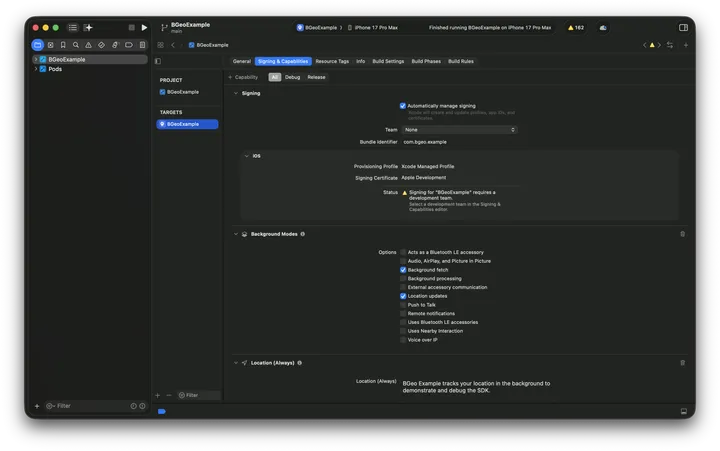
Enable the Background Modes capability in Xcode
The Info.plist entry above must be paired with the capability enabled in
the Xcode project:
- Open
ios/YourApp.xcworkspacein Xcode. - Select your app target → Signing & Capabilities.
- Click + Capability, choose Background Modes.
- Check Location updates.
Nothing to do beyond npx expo prebuild. Prebuild runs pod install for
you, and the plugin has already written every key listed under
Plugin options into the generated Info.plist:
| Generated key | Comes from |
|---|---|
NSLocationAlwaysAndWhenInUseUsageDescription | locationAlwaysAndWhenInUsePermission |
NSLocationWhenInUseUsageDescription | locationWhenInUsePermission |
NSMotionUsageDescription | motionPermission |
UIBackgroundModes → location | always added (fetch too when isIosBackgroundFetchEnabled) |
NSLocationTemporaryUsageDescriptionDictionary → DeliverFullAccuracy | fullAccuracyPurpose |
The plugin merges UIBackgroundModes rather than replacing it, so it coexists
with expo-location and expo-task-manager.
No AppDelegate modification is needed. The engine registers itself from a
+load launch observer, so it resumes tracking after an OS-initiated relaunch
without any app-side wiring.
No Xcode capability step is needed. For background location the
UIBackgroundModes array in Info.plist is the capability — checking the
box in Xcode only writes that same key, and the plugin already did.
Android setup
Add the local Maven repo
The closed engine ships as an AAR in a local Maven repo inside the
package. Add that repo to your project’s android/build.gradle:
allprojects { repositories { maven { url("$rootDir/../node_modules/@dc-bgeo/react-native-background-geolocation/android/libs") } }}Autolinking wires up the rest of the Gradle module.
Declare the background-location permission
Google Play policy requires the app, not a library, to own the background-location declaration (and the corresponding Play Console disclosure), so this one is deliberately not merged from the engine AAR:
<uses-permission android:name="android.permission.ACCESS_BACKGROUND_LOCATION" />Nothing to do beyond npx expo prebuild. The plugin writes both pieces of
Android wiring into the generated project:
- the engine’s local Maven repo into
android/build.gradle, as a path relative to$rootDirso the generated project stays portable; <uses-permission android:name="android.permission.ACCESS_BACKGROUND_LOCATION" />intoandroid/app/src/main/AndroidManifest.xml.
Set isAndroidBackgroundLocationEnabled: false if your app deliberately ships
without background location — the module then only tracks while it is in the
foreground.
Permissions merged from the engine AAR
The engine AAR’s manifest merges the rest of the permissions the module needs directly into your app on both setups — you never declare these yourself:
| Permission | Why |
|---|---|
ACCESS_FINE_LOCATION | Foreground GPS fixes. |
ACCESS_COARSE_LOCATION | Network/cell-grade location fallback. |
ACTIVITY_RECOGNITION | Drives the moving/still motion state machine via Play Services. |
FOREGROUND_SERVICE | Required to run the tracking foreground service. |
FOREGROUND_SERVICE_LOCATION | Android 14+ typed foreground-service permission for the location service type. |
RECEIVE_BOOT_COMPLETED | Resumes tracking after reboot when startOnBoot is enabled. |
WAKE_LOCK | Keeps the device awake briefly for background processing. |
POST_NOTIFICATIONS | Android 13+ permission for the required tracking notification. |
INTERNET / ACCESS_NETWORK_STATE | Native HTTP upload of queued locations. |
The tracking service and its receivers merge in the same way — there is nothing else to declare. See Permissions & background location for the runtime request flow and the Play Console disclosure requirement.
Gradle notes
- minSdk 24, compileSdk/targetSdk 36 (overridable via
rootProject.ext, samesafeExtGetpattern RN modules use). - Kotlin 2.1.20, Android Gradle Plugin 8.13.0.
- The module requires the New Architecture (
newArchEnabled=true); it applies thecom.facebook.reactGradle plugin only when that flag is set. - Android namespace is
com.bgeo.rn(the bridge); the vendored engine AAR owns thecom.bgeonamespace separately, so there’s no resource/R-class clash.
Verify the install
Build and run the app on a device or simulator, then confirm the native module loaded:
import BackgroundGeolocation from '@dc-bgeo/react-native-background-geolocation';
const state = await BackgroundGeolocation.getState();console.log(state); // { enabled: false, ... } — false is expected before ready()/start()
If this resolves without throwing, the native module linked correctly on
that platform. See getState()
for the full return shape, and Quickstart
for wiring up ready()/start() and your first location events.