

License keys
BGeo verifies license keys offline — no device ever calls a license server. A key is an Ed25519-signed token bound to your app, read from the manifest at launch, before any of your code runs.
Evaluation
Debuggable builds run without a key. You can integrate and test the whole SDK before buying anything.
Adding the key
The key lives in the app manifest — the same mechanism for React Native,
Flutter and native apps — read at launch. There is no Config option; one
license covers your app however it is built, because it is bound to your app
identity, not to a framework.
<application> <meta-data android:name="com.bgeo.license" android:value="BGEO1....YOUR_KEY" /></application>Production keys are bound to your app
A production key is bound to your applicationId plus the SHA-256 of your
app-signing certificate.
Register the Play App Signing certificate, not your upload key. If you use Play App Signing (the default for new apps), Google re-signs your bundle with a certificate you never hold locally — a key issued against your upload certificate will validate in your locally-built release APK and fail for every user who installs from Play. The SHA-256 to register is in the Play Console under Setup → App integrity → App signing key certificate.
Build-date gating: shipped apps never brick
A key is a perpetual license with one year of updates, not a subscription that can lock users out of an app they have already installed. A production key is valid as long as its expiry is on or after the date the SDK build was released. The device’s wall clock is never consulted, so there is nothing on the device to tamper with and nothing that can brick a shipped app.
Concretely:
- An app built with an SDK version released during your license term keeps working forever, for every user, entirely offline — renewing or not has no effect on it once shipped.
- Expiry only affects future SDK upgrades: to move to a version released after your key expired, you need a renewed key first.
flowchart LR
    A[Buy a license] --> B["Expiry date set\n(1 year of updates)"]
    B --> C{SDK build's release date<br/>vs. key expiry}
    C -->|"on or before expiry"| D["ready()/start() succeed\nkeeps working forever, offline"]
    C -->|"after expiry"| E["ready()/start() throw\nLICENSE_EXPIRED"]
    E --> F[Renew the pack on bgeo.dev]
    F --> G[Unlocks SDK versions\nreleased after the old expiry]
Error codes
In a release build, an invalid key makes ready() and start() throw a
BGeoException carrying one of these codes (see
License codes):
| Code | Meaning |
|---|---|
LICENSE_MISSING | No key in a release build |
LICENSE_INVALID | Bad signature or malformed token |
LICENSE_EXPIRED | Key expired before this SDK build |
LICENSE_APP_MISMATCH | Key not bound to this application id / certificate |
try { BackgroundGeolocation.ready(config)} catch (e: BGeoException) { if (e.code.startsWith("LICENSE_")) { // Surface it: in a release build this is why nothing is tracking. }}Debuggable builds never produce these codes — they run unlicensed whatever the key says.
Buying and managing keys
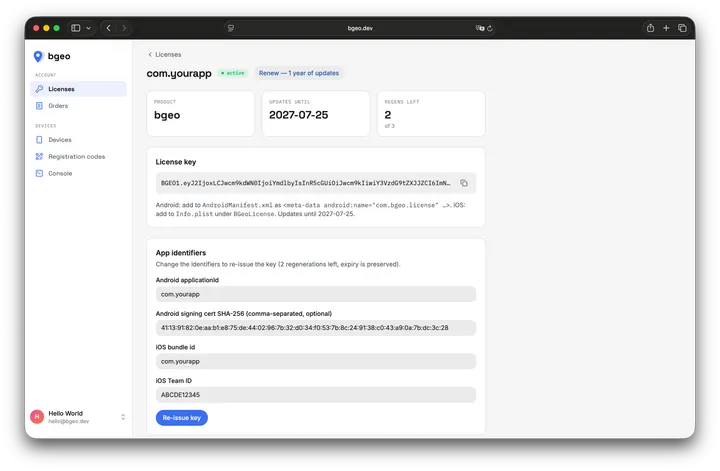
License keys are purchased and managed from the bgeo.dev dashboard: buy a key for an app identity, renew a pack before it expires, or look up which SDK versions a key currently covers.
Anti-tamper, honestly
The gate stops honest-but-unlicensed use and casual copying. Like every offline-licensed SDK, a determined attacker can patch the binary. We do not pretend otherwise — the value is the SDK, the updates, and the support.